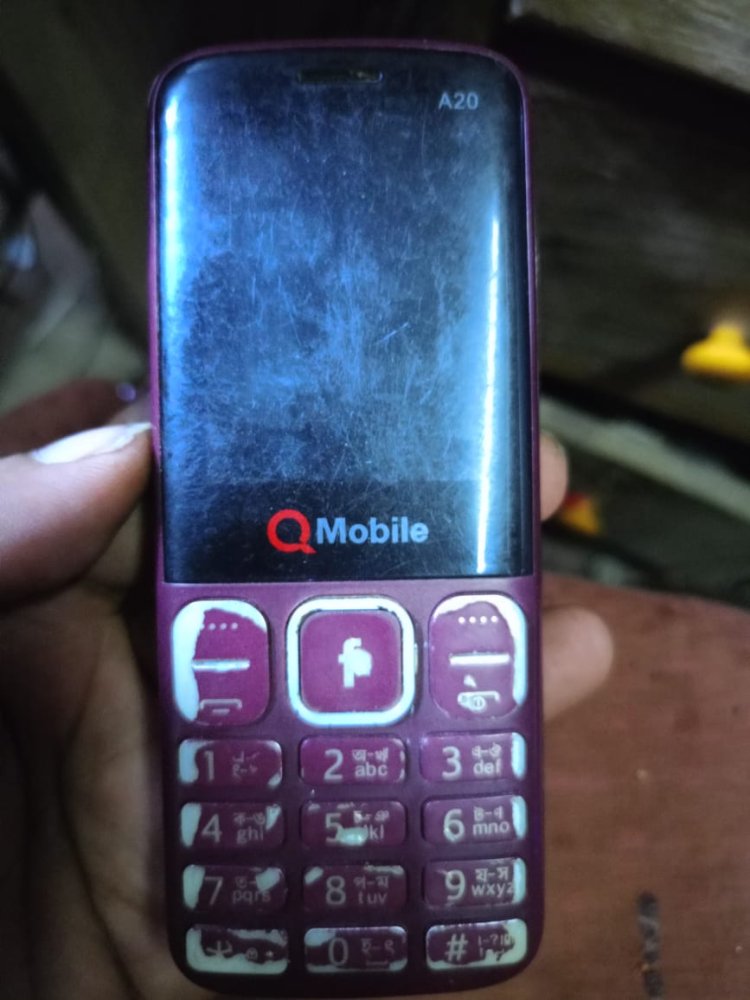
Qmobile A20 Flash File
WhatsApp: 01551789497
Card found : F03C2EF2 , v0165
Infinity-Box Chinese Miracle II : SC/RDA Module [SCR] v1.07
SCRD mode : AUTO
SPRD mode : SC6530 : REV : 0000 : NOR : [ 4MB-8MB ]
SPRD mode : SC6531 : REV : E000 : NOR : [ 4MB ]
Operation : Read Flash [ v1.07 ]
1. Power off device
2. Press and hold BootKey or use BootCable
3. Insert cable and battery in device!
Wait for device ...
Device Connected!
BootVersion : SPRD3
BootSource : InternalLibrary
ERROR : FDL NOT started!
Error : Loader send failed!
Wrong model selected! Select correct one!
Reconnect Power/Cable!
SPRD mode : SC6531 : REV : E001 : NOR : [ 4MB-8MB ]
Operation : Read Flash [ v1.07 ]
1. Power off device
2. Press and hold BootKey or use BootCable
3. Insert cable and battery in device!
Wait for device ...
Device Connected!
ERROR : Protocol HandShake failed!
Error : Fail to init protocol!
Remove battery, cable. Check cable and connection. Repeat operation!
Reconnect Power/Cable!
Operation : Read Flash [ v1.07 ]
1. Power off device
2. Press and hold BootKey or use BootCable
3. Insert cable and battery in device!
Wait for device ...
Device Connected!
ERROR : Protocol HandShake failed!
Error : Fail to init protocol!
Remove battery, cable. Check cable and connection. Repeat operation!
Reconnect Power/Cable!
Operation : Read Flash [ v1.07 ]
1. Power off device
2. Press and hold BootKey or use BootCable
3. Insert cable and battery in device!
Wait for device ...
Device Connected!
ERROR : Protocol HandShake failed!
Error : Fail to init protocol!
Remove battery, cable. Check cable and connection. Repeat operation!
Reconnect Power/Cable!
Operation : Read Flash [ v1.07 ]
1. Power off device
2. Press and hold BootKey or use BootCable
3. Insert cable and battery in device!
Wait for device ...
Device Connected!
BootVersion : SPRD3
BootSource : InternalLibrary
ERROR : FDL NOT started!
Error : Loader send failed!
Wrong model selected! Select correct one!
Reconnect Power/Cable!
Operation : Read Flash [ v1.07 ]
1. Power off device
2. Press and hold BootKey or use BootCable
3. Insert cable and battery in device!
Wait for device ...
Device Connected!
ERROR : Protocol HandShake failed!
Error : Fail to init protocol!
Remove battery, cable. Check cable and connection. Repeat operation!
Reconnect Power/Cable!
Operation : Read Flash [ v1.07 ]
1. Power off device
2. Press and hold BootKey or use BootCable
3. Insert cable and battery in device!
Wait for device ...
Device Connected!
BootVersion : SPRD3
ERROR : BOOT ACK not received!
Error : Fail to init protocol!
Check cable, connection and drivers!
Reconnect Power/Cable!
Operation : Read Flash [ v1.07 ]
1. Power off device
2. Press and hold BootKey or use BootCable
3. Insert cable and battery in device!
Wait for device ...
Device Connected!
BootVersion : SPRD3
ERROR : BOOT ACK not received!
Error : Fail to init protocol!
Check cable, connection and drivers!
Reconnect Power/Cable!
Operation : Read Flash [ v1.07 ]
1. Power off device
2. Press and hold BootKey or use BootCable
3. Insert cable and battery in device!
Wait for device ...
Device Connected!
BootVersion : SPRD3
BootSource : InternalLibrary
ERROR : FDL NOT started!
Error : Loader send failed!
Wrong model selected! Select correct one!
Reconnect Power/Cable!
SPRD mode : SC6531 : REV : C000 : NOR : [ 4MB-8MB ]
Operation : Read Flash [ v1.07 ]
1. Power off device
2. Press and hold BootKey or use BootCable
3. Insert cable and battery in device!
Wait for device ...
Device Connected!
ERROR : Protocol HandShake failed!
Error : Fail to init protocol!
Remove battery, cable. Check cable and connection. Repeat operation!
Reconnect Power/Cable!
Operation : Read Flash [ v1.07 ]
1. Power off device
2. Press and hold BootKey or use BootCable
3. Insert cable and battery in device!
Wait for device ...
Device Connected!
ERROR : Protocol HandShake failed!
Error : Fail to init protocol!
Remove battery, cable. Check cable and connection. Repeat operation!
Reconnect Power/Cable!
Operation : Read Flash [ v1.07 ]
1. Power off device
2. Press and hold BootKey or use BootCable
3. Insert cable and battery in device!
Wait for device ...
Device Connected!
BootVersion : SPRD3
ERROR : BOOT ACK not received!
Error : Fail to init protocol!
Check cable, connection and drivers!
Reconnect Power/Cable!
Operation : Read Flash [ v1.07 ]
1. Power off device
2. Press and hold BootKey or use BootCable
3. Insert cable and battery in device!
Wait for device ...
Device Connected!
BootVersion : SPRD3
BootSource : InternalLibrary
BootVersion : Spreadtrum Boot Block version 1.2
Port speed : 921600
FDL Flash : Control transfered!
Boot Done!
CS0_MEM : SPI : [WINBOND] : W25Q32 : 0x00400000 [ 4MiB ]
Read Flash Ok, Size : 4.00 MiB
Platform Version: MOCOR_12C.W13.04.05_Release
Project Version: SC6531_BAR
MMI Version: K16_ALF_S5712_QMOBILE_V1.0_Release
HW Version: SC6531_BAR
Saved to : C:\Users\arifi\Desktop\Qmobile A20 Flash File\K16_ALF_S5712_QMOBILE_V1.0_Release.bin
Done!
Elapsed: 00:01:22
Reconnect Power/Cable!
WhatsApp:+8801551789497
What's Your Reaction?